A WordPress website typically costs between $100 and $50,000+, depending on complexity, features, and who builds it.
But not all WordPress websites cost the same. Some are very affordable, while others require a bigger investment. It all depends on what you want to build and who you hire. In this guide, we’ll break down every cost in a simple way so you can easily understand what you’re paying for.
Quick cost breakdown to complete a WordPress site:
- DIY website: $75-$500 per year
- Small business website: $2,000-$10,000 upfront
- eCommerce website: $5,000-$30,000+
- Enterprise website: $25,000-$100,000+
- Ongoing costs: $50-$500+ per month
What are the Main Costs of Building a WordPress Website?
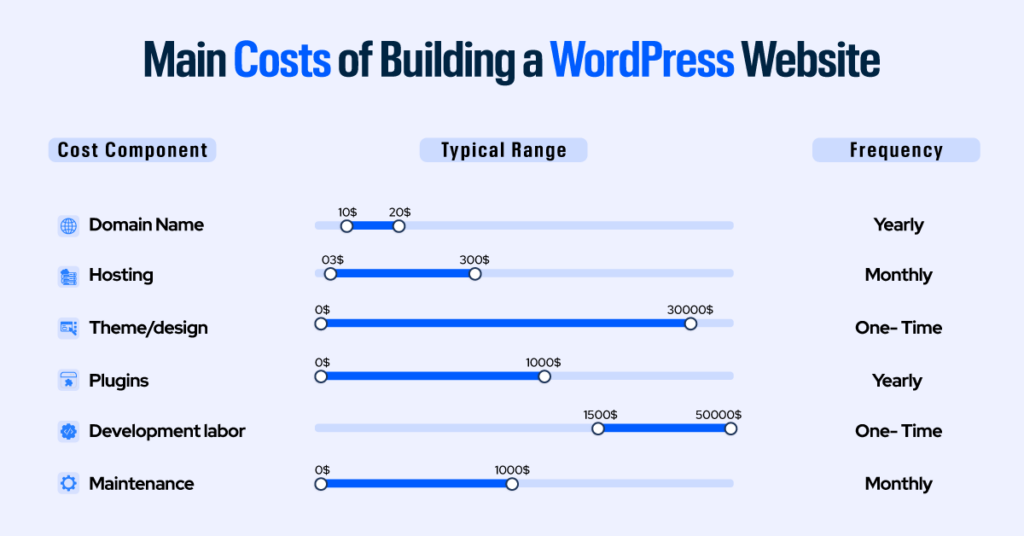
A WordPress website has six core cost components: domain, hosting, design, plugins, development, and maintenance. These costs vary depending on the size and complexity of your site.
| Cost Component | Typical Range | Frequency |
| Domain name | $10-$20 | Yearly |
| Hosting | $3-$300/month | Monthly |
| Theme/design | $0-$30,000+ | One-time |
| Plugins | $0-$1,000+/year | Yearly |
| Development labor | $1,500-$50,000+ | One-time |
| Maintenance | $0-$500/month | Monthly |
Each of these costs varies depending on the complexity of your site and who builds it.
1. Domain Name ($10-$20/year)
Your domain is your web address. Yourbusiness.com, .net, and .org domains cost between $10 and $20 per year through registrars like Namecheap, GoDaddy, or Google Domains (Squarespace). Premium domains (short, dictionary-word domains) can cost hundreds or thousands of dollars, but most businesses don’t need one.
Watch the renewal price, not just the registration price. Many registrars offer first-year deals at $1-$5 but charge $15-$20 annually from year two onward. Also note that many managed hosting plans include a free domain for the first year – worth factoring into your comparison.
2. Web Hosting ($3-$300/month)
Hosting is where your website lives. It’s the server that stores your files and delivers them to visitors. This is the most important cost decision you’ll make, because hosting quality directly affects site speed, uptime, and security.
| Hosting Type | Monthly Cost | Best For | Trade-offs |
| Shared hosting | $3-$15 | Personal blogs, hobby sites | Slow under load, shared resources |
| Managed WordPress hosting | $25-$150 | Business sites, eCommerce | More expensive, but faster and supported |
| VPS hosting | $20-$80 | Growing sites needing flexibility | Requires some technical knowledge |
| Cloud hosting | $10-$100 | Variable-traffic sites | Cost can spike with traffic surges |
| Dedicated hosting | $100-$300+ | Enterprise, high-traffic platforms | Expensive, requires technical management |
Shared hosting is the most affordable hosting option for WordPress. As a starting point, it’s fine. But businesses expecting more than a few hundred visitors per day should budget for managed WordPress hosting from the outset. The performance difference is significant, and migrating later often costs time and money.
4. Themes and WordPress Site Design Cost ($0-$200 One-time, or $1,500-$30,000+ for Custom)
A WordPress theme controls your site’s visual design and layout. The cost of WordPress site design varies more than almost any other component. Free themes from the WordPress.org repository are a reasonable starting point for simple sites. Premium themes sold on marketplaces like ThemeForest typically cost $40-$100 as a one-time purchase and include more design options, demo templates, and support.
For brands that need a truly unique appearance, custom theme development is another category entirely. A custom theme for a small business typically costs $1,500-$5,000. A complex enterprise-level custom theme can exceed $30,000. The modern alternative is using a premium page builder like Elementor Pro paired with a lightweight base theme. This gives you custom-level design flexibility at a fraction of the cost. It’s often the better value.
Beyond the theme itself, professional web design services add to the total. Hiring a web designer separately from a developer depends on the complexity of what you need designed. It can typically cost $30-$75/hour, or $500-$15,000 as a project fee. For most small businesses, a well-chosen premium theme with some customization delivers a professional result without the custom design price tag.
5. Plugins ($0-$1,000+/year)
Plugins are what make WordPress do things. They can come in the form of contact forms, SEO optimization, e-commerce, security scanning, backups, caching, email marketing integration, and more. The official plugin directory has over 60,000 plugins, many free. A typical professional WordPress site runs 15-18 plugins.
Free plugins cover the basics well. Essential free plugins include Yoast SEO or Rank Math (search optimization), Wordfence (security), WPForms Lite (contact forms), and LiteSpeed Cache (site speed). As your needs grow, premium plugins typically cost $50-$300 per year each.
But beware of a common mistake of installing too many plugins. It slows your site and creates security vulnerabilities. Aim for plugins that each serve a clear purpose. A good page builder like Elementor Pro can replace four or five separate premium plugins by bundling form, popup, theme, and WooCommerce builders in one tool.
What You’ll Pay for Design & Development Work
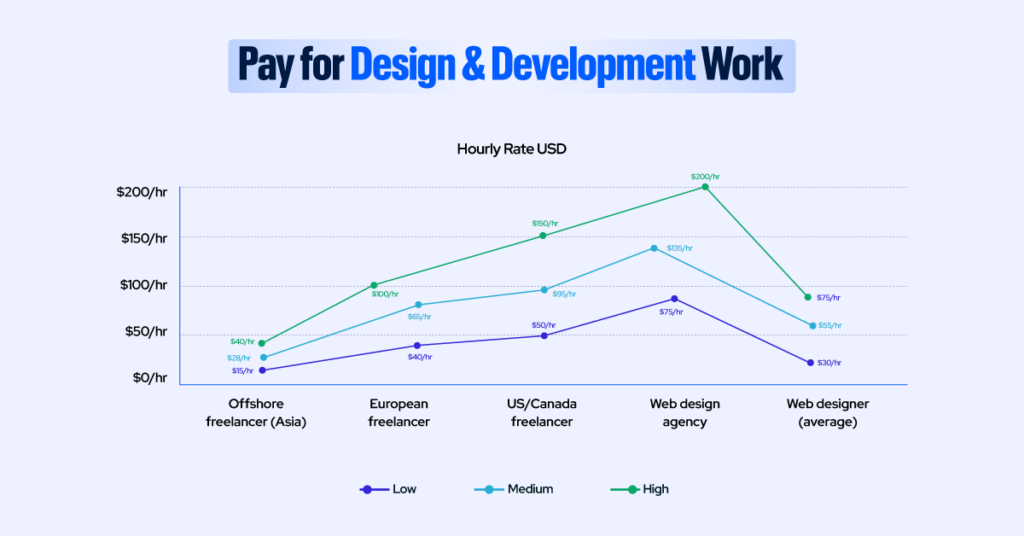
Website costs often extend beyond software and hosting. Design, development, and ongoing maintenance can be a major part of your budget. Pricing varies based on who you hire, their expertise, and the level of support you need. Understanding these costs helps you plan realistically and avoid unexpected expenses.
1. Development and Design Labor ($15-$200/hour)
If you’re not building the site yourself, labor is typically the highest cost. Rates vary widely by geography and experience level.
| Provider Type | Hourly Rate | Notes |
| Offshore freelancer (Asia) | $15-$40/hr | Lower cost; requires careful vetting |
| European freelancer | $40-$100/hr | Solid quality range |
| US/Canada freelancer | $50-$150/hr | Experienced mid-range professionals |
| Web design agency | $75-$200/hr | Project management included; higher accountability |
| Web designer (average) | $30-$75/hr | Visual design only; may not handle dev |
2. Ongoing Maintenance ($0-$500/month)
A WordPress site needs regular updates to WordPress core, themes, and plugins. It needs backups. It needs security monitoring. These aren’t optional tasks. Neglected WordPress sites become hacked WordPress sites.
The following are your options:
- DIY (free, but time-consuming), managed hosting that handles updates automatically ($30-$200/month)
- A freelance developer on retainer ($200-$500/month),
- A specialist maintenance agency ($500-$1,000+/month)
Most small business sites are well-served by managed hosting plus a few hours per month of your own attention.
Cost to Build a WordPress Website by Type: Realistic Ranges
The cost of a WordPress website depends primarily on the type of site you are building. Here are realistic total cost ranges by website type:
| Category | Website Type | Cost Range | Pricing Model |
| Personal / Blog | DIY Blog or Portfolio | $75 – $500 | Per year (all-in) |
| Small Business | Brochure / Lead Gen Site | $2,000 – $10,000 | Upfront + $50–$200/month ongoing |
| Ecommerce | Online Store (WooCommerce) | $5,000 – $30,000 | Upfront + transaction fees |
| Corporate | Mid-Size Corporate Site | $10,000 – $40,000 | Upfront build cost |
| Enterprise | Enterprise / Custom Platform | $25,000 – $100,000+ | Upfront; varies by scope |
These ranges assume professional development for everything above a personal blog. A small business owner comfortable with WordPress can cut the $2,000-$10,000 range significantly by doing their own design and content. But it takes time, and “free” labor isn’t actually free.
For a more detailed breakdown of what goes into each type of project, you can explore our WordPress development service structure.
Is WordPress Still a Good Choice in 2026?
Yes, WordPress remains one of the best platforms for building websites due to its flexibility, scalability, and cost efficiency. WordPress powers over 43% of all websites globally (W3Techs), making it the most widely used content management system (CMS).
Key reasons WordPress remains dominant are:
- Flexibility: Customize design, features, and integrations without platform restrictions
- Ownership: You fully control your data, unlike platforms like Wix or Squarespace
- Scalability: Used by small businesses and enterprises like NASA and TechCrunch
- Ecosystem: 60,000+ plugins for SEO, eCommerce, security, and automation
The catch is that “WordPress is free” is only half the story. The software is free. The website is not. An accurate WordPress website cost analysis that breaks down every component from domain to design to ongoing maintenance is what separates businesses that budget confidently from those who get blindsided mid-project.
That’s what this pricing guide covers.
Complete WordPress Cost Reference Table
Take a look at this cost reference table for WordPress:
| Component | Low End | Mid Range | High End | Frequency |
| Domain name | $10 | $15 | $25+ | Per year |
| Shared hosting | $3/mo | $8/mo | $15/mo | Per month |
| Managed WP hosting | $25/mo | $75/mo | $200/mo | Per month |
| Theme (premium) | $40 | $80 | $200 | One-time or yearly |
| Custom theme (dev) | $1,500 | $5,000 | $30,000+ | One-time |
| Plugins (premium set) | $0 | $300 | $1,000+ | Per year |
| SSL certificate | $0 | $50 | $100+ | Per year |
| Security (premium) | $100 | $300 | $1,000+ | Per year |
| Freelance developer | $15/hr | $75/hr | $150/hr | Per hour |
| Agency development | $3,000 | $12,000 | $50,000+ | Per project |
| Maintenance (DIY) | $0 | $50/mo | $100/mo | Per month |
| Maintenance (agency) | $500/mo | $750/mo | $1,000+/mo | Per month |
| SEO tools | $0 | $120/mo | $500+/mo | Per month |
| Marketing (agency) | $500/mo | $3,000/mo | $20,000+/mo | Per month |
What Hidden Costs Should You Expect?
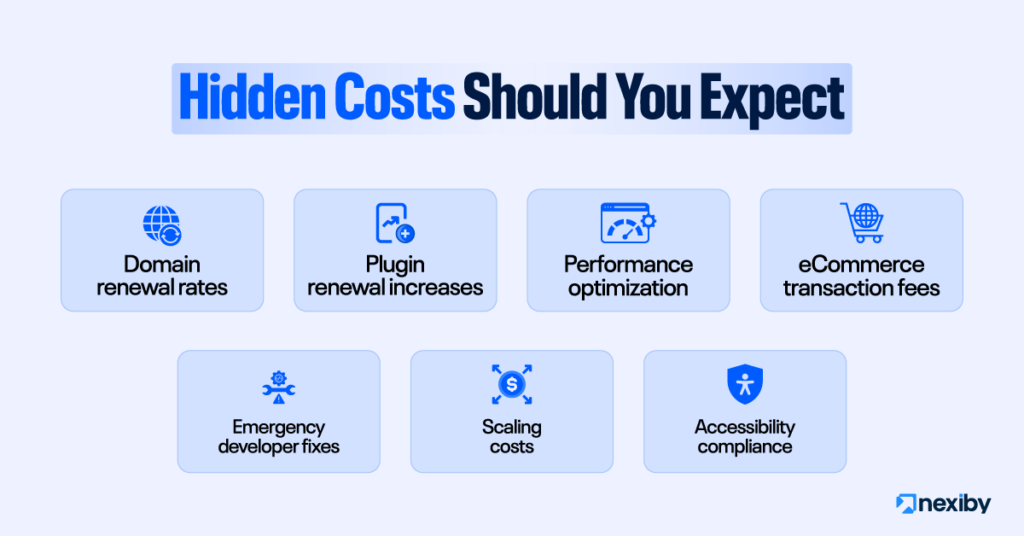
Most WordPress projects exceed budget due to overlooked recurring and indirect costs. Here are some hidden WordPress costs:
- Domain renewal rates: The year-one promotional price is not the ongoing price. Always check renewal costs before registering.
- Plugin renewal increases: Premium plugins renew annually, and prices increase over time. A set of 8-10 premium plugins can cost $500-$1,000/year to maintain.
- Performance optimization: Content delivery networks (CDNs), image optimization, and caching tools typically add $50-$300/year. According to Baymard’s UX statistics, a site that loads in more than 3 seconds loses roughly 40% of visitors.
- eCommerce transaction fees: Payment gateways like Stripe and PayPal charge approximately 2.9% + $0.30 per transaction. On $100,000 in annual sales, that’s $3,200 in fees.
- Emergency developer fixes: Something will break. Unplanned developer time at $75-$150/hour adds up quickly. A maintenance retainer or managed hosting reduces this risk.
- Scaling costs: As traffic grows, hosting plans need to be upgraded. What worked at 500 visitors/month will struggle at 50,000 visitors/month.
Accessibility compliance: Web accessibility (WCAG standards) is becoming a legal requirement in many regions. Retrofitting an existing site for accessibility costs more than building it from the start.
Should You Build Your WordPress Website Yourself or Hire a Professional?
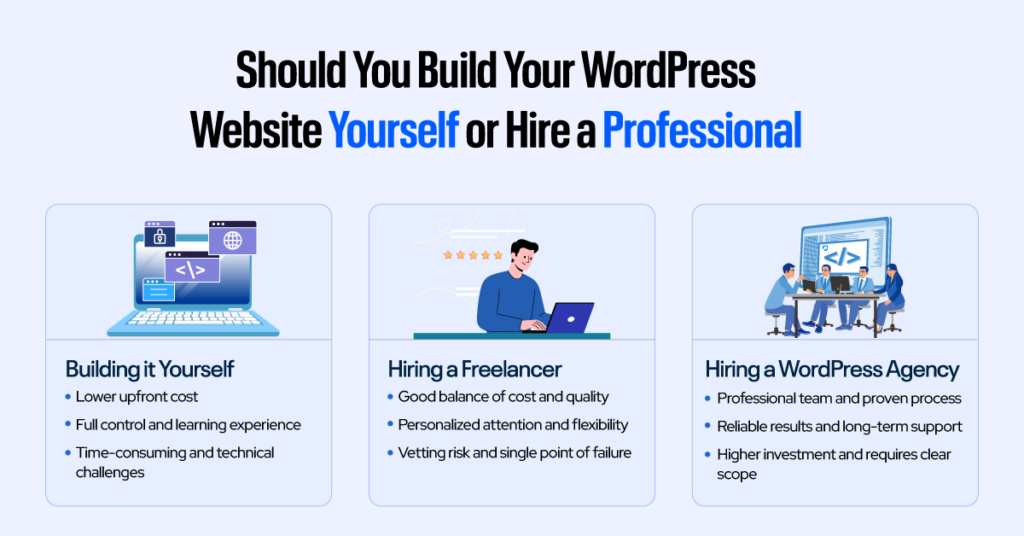
The right choice depends on your budget, time, and how critical the website is to your business.
- Choose DIY if you have time and a simple site
- Choose a freelancer for the best cost-to-quality balance
- Choose an agency for complex or business-critical websites
Building it Yourself
Modern tools have made it genuinely possible for non-coders to build professional-looking WordPress sites. This is particularly true for page builders like Elementor. If you’re willing to invest 20-40 hours learning the platform, DIY is viable for simple business sites with standard features.
The hidden cost is your own time. If your hourly time value is $75-$150 as a business professional, spending 30 hours building a website that a developer would complete in 20 hours at $80/hour isn’t actually cheaper.
DIY makes sense for personal blogs, portfolios, simple brochure sites, and entrepreneurs with time and patience to learn.
Hiring a Freelancer
A competent freelance WordPress developer is the best-value option for most small to mid-sized business sites. The challenge is finding one. The market ranges from genuinely skilled professionals to beginners who’ve watched a few tutorials and massively overquote or underdeliver.
A smart move here is asking to see live sites they’ve built, checking performance scores (Google PageSpeed Insights) on those sites, and asking specifically how they handle security and backups. Get a written project scope before any money changes hands.
Hiring a WordPress Agency
WordPress agency pricing is the highest tier. But it also comes with the most structured process. You get project management, multiple skill sets (design, development, content, SEO), a contractual accountability structure, and typically a more reliable timeline. For projects over $15,000, or for businesses where the website is genuinely critical infrastructure, an agency often reduces total project risk enough to justify the premium.
The cost to hire a WordPress agency for a standard small business site starts at $5,000 and commonly reaches $15,000-$25,000 for a well-scoped project with custom design, content, and SEO. Enterprise builds or complex eCommerce platforms can exceed $50,000. The most important discipline when working with an agency is defining the scope before signing. Vague briefs lead to expensive change orders.
| Approach | Typical Cost | Best For | Main Risk |
| DIY | $100-$1,500 | Personal sites, simple brochure sites | Time investment; technical gaps |
| Freelancer | $1,500-$15,000 | Small business sites, eCommerce | Vetting difficulty; single point of failure |
| Agency | $5,000-$50,000+ | Corporate, enterprise, complex builds | Higher cost; needs clear brief to avoid bloat |
WordPress Website Pricing Structure: Budget Planning Checklist
Before you spend a dollar on your WordPress site, work through this list. Make sure you don’t fall into a situation of discovering costs mid-build. The single best way to protect your budget is to understand the full WordPress website pricing structure upfront.
- Decide: WordPress.org (self-hosted, more control) or WordPress.com (hosted, easier management)?
- Register your domain name through a reputable registrar; check the renewal price, not just the promo rate.
- Choose a hosting tier matched to your expected traffic, not your current traffic.
- Determine whether you need a premium theme, a page builder, or custom theme development.
- List the specific features your site needs (contact form, booking, eCommerce, membership) and research which plugins cover them before budgeting.
- Confirm your hosting includes a free SSL certificate, or budget $70-$100/year for one.
- Decide who will handle ongoing maintenance: DIY, managed hosting, freelancer, or agency.
- Budget for content creation separately from design and development costs.
- If building an eCommerce site, calculate estimated transaction fees at expected revenue levels.
- Set aside a 15-20% contingency budget for unexpected changes and scope adjustments.
- Plan for at least 6 months of post-launch costs before expecting meaningful organic traffic.
How Much Should You Budget for a WordPress Website?
For most businesses, a realistic first-year WordPress budget is:
- Small business website: $3,000-$10,000 total
- eCommerce website: $7,000-$25,000 total
- Ongoing costs: $1,000-$3,000 per year
Budget rule of thumb:
- 70-80% = build cost
- 20-30% = ongoing costs
This prevents underestimating long-term expenses.
Conclusion
Don’t look at the cost to build a WordPress website as just a cost – it’s a business asset. A properly built site can generate leads, sales, and long-term growth. A poorly built one becomes a liability. The difference is almost always in how you budget and where you don’t cut corners.
If you’re planning a WordPress website and want a realistic estimate based on your business needs, features, and growth goals, you can explore our WordPress development pricing and services for a detailed breakdown.
Frequently Asked Questions
Can I build a WordPress website for free?
You can build a WordPress website for free using the open-source software, but you still need to pay for a domain name ($10-$20/year) and hosting ($3+/month) to make it live. Free WordPress.com plans exist, but they limit customization and are not suitable for business use.
What is the average cost of a WordPress website in 2026?
The average cost of a WordPress website in 2026 ranges from $75-$500 per year for DIY sites and $3,000-$10,000+ for professionally built small business websites. eCommerce and custom builds can cost $5,000-$30,000 or more, depending on complexity.
How much does a WordPress website cost per month?
A WordPress website typically costs $50-$500+ per month, including hosting, maintenance, plugins, and security. Basic sites stay on the lower end, while business or eCommerce sites require a higher monthly investment.
What does WordPress website maintenance cost?
WordPress maintenance costs range from $0 to $500+ per month. DIY maintenance is low-cost but time-intensive, while managed hosting ($30-$200/month) or professional support ($200-$500/month) offers better reliability and security.
Is WordPress.org or WordPress.com better for a business website?
WordPress.org is better for most business websites because it offers full control over design, plugins, and SEO. WordPress.com is easier to manage but restricts customization unless you pay for higher-tier plans.
How much does a WordPress eCommerce website cost?
A WordPress eCommerce website typically costs $5,000-$30,000+ to build, plus ongoing costs like hosting, plugins, and payment processing fees (around 2.9% + $0.30 per transaction). Costs increase with features and scale.
What is the cost to hire a WordPress developer?
Hiring a WordPress developer costs between $15 and $150 per hour, depending on experience and location. A complete small business website typically costs $1,500-$10,000 when built by a freelancer.
How long does it take to build a WordPress website?
A WordPress website typically takes 1-4 weeks for simple sites and 4-12 weeks for custom or eCommerce projects. The timeline depends on complexity, content readiness, and development requirements.