Every support team knows the feeling. The same question arrives for the fourth time this week, the answer exists somewhere in a shared drive, and nobody can surface it fast enough to help the customer waiting on the other end.
Nexiby is a web design, development, and marketing agency, and that pattern showed up in almost every client project we touched. Ticket volume stayed high because the documentation was buried, stale, or impossible to search. Onboarding dragged for the same reason.
So we stopped recommending tools and started working out how to build a knowledge base platform that solves retrieval rather than storage. That work became Kbixy, an AI-powered knowledge base that turns what a team already knows into answers people can find in seconds.
This article opens up the architecture behind it, the design calls we made, and the trade-offs we accepted to get there.
Why a Web Agency Decided to Build a Custom Knowledge Base Platform
Agencies sit in an unusual position. We see the same operational failure repeat across dozens of unrelated businesses, which makes the pattern impossible to miss and very tempting to fix properly.
The Documentation Gaps We Saw Across Nexiby Client Projects
The first signal was always ticket volume. A client would launch a well-built product, then spend the next quarter answering questions that their own help center technically already covered. The content existed. Nobody could find it.
The second signal was onboarding. New hires at our clients learned the job by interrupting senior staff, because the written process lived in a folder nobody had opened since the last reorganization. Internal standard operating procedures were scattered across Google Docs, Slack threads, email forwards, and screen recordings with names like “Untitled recording 42”.
The third signal was decay. Documentation that nobody could update easily stopped being updated at all, and a help center people stop trusting is worse than no help center, because every wrong answer costs a support conversation.
Building internal tools for our own team is how Nexiby works through problems like this. Taskminy (a personal task management app) and Lupofy (a smart link management platform) came out of the same instinct, and each one pushed the agency further toward a product mindset. Kbixy is the version of that instinct aimed at knowledge.
Where Existing Knowledge Base Software Falls Short
Plenty of good tools already exist. Zendesk Guide, Confluence, Notion, Document360, GitBook, and Help Scout Docs all have real strengths. The gaps we kept hitting were consistent.
- Bloated, slow-loading interfaces that hurt Core Web Vitals, organic visibility, and reader patience in equal measure.
- Clunky content editors that quietly discourage non-technical team members from ever updating an article.
- Rigid branding options that make a help center feel like a different company from the product it supports.
- Keyword matching search that fails the moment a user phrases a question differently from the article title.
- Video and screen recordings stored somewhere else entirely, so the fastest knowledge in the company stays unsearchable.
None of these are fatal on their own. Together they explain why so many teams own a knowledge base and still answer the same question every week.
Designing a Frictionless User Experience
A knowledge base has two users who want opposite things. One wants to leave as fast as possible with an answer. The other wants to stay and organize. Designing for both at once is most of the work.
Structuring Information Architecture for Instant Answers
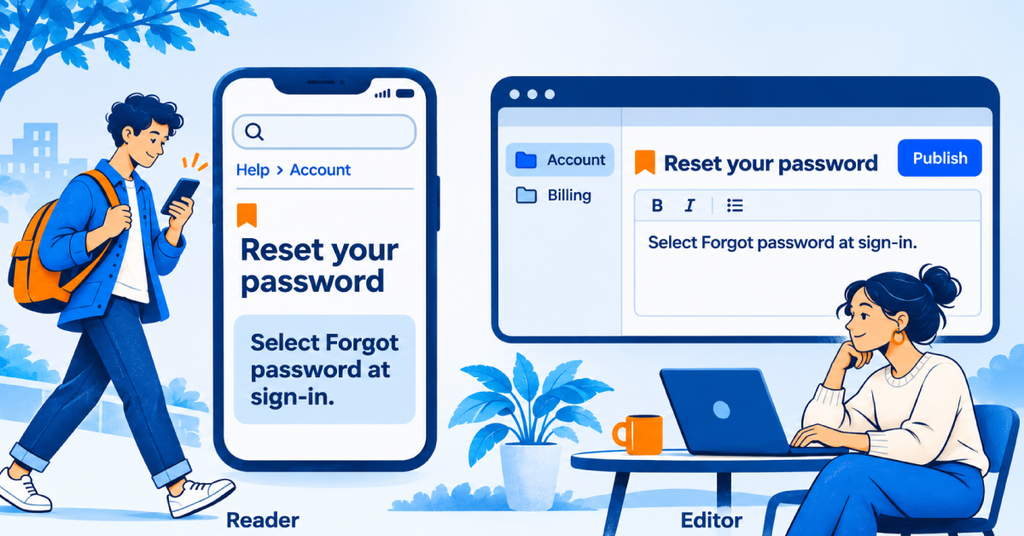
Nexiby’s design team mapped two distinct user journeys before a single wireframe was drawn: the reader (seeking an immediate answer) and the editor (organizing categories and publishing articles without friction). The reader arrives impatient, often on a phone, mid-task, so the layout puts search above the fold, answers in the first paragraph, and uses breadcrumb navigation to orient readers who land deep in the hierarchy.
The editor arrives between meetings, so the taxonomy stays flat enough to browse and forgiving enough that nobody has to design a category structure before publishing a first article. The rule we settled on: no answer sits more than two clicks from the workspace home page. Hierarchy deeper than that is usually hiding a search problem. Every decision was tested against one question: does this help someone find an answer faster?
Designing for Readability, Accessibility, and Speed
The visual system is deliberately quiet. Generous line height, a measure around 70 characters, and strong contrast between headings and body text, because people scan documentation rather than read it.
Typography choices, mobile responsiveness, and zero-clutter layouts were treated as first-class engineering requirements, not afterthoughts. The goal was a reading experience that feels native to the modern web: fast, accessible, and distraction-free.
The Tech Stack Behind Kbixy and How It Scales
A knowledge base looks simple from the outside. Underneath it is a multi-tenant application, a search index, a media pipeline, and a public web surface that has to rank, all of which have to stay fast as the content grows.
Choosing Our Frontend and Backend Frameworks
Three criteria drove every framework decision: performance, developer velocity, and long-term maintainability. As an agency that works extensively with React, Laravel, JavaScript, and modern UI/UX tooling, we leaned into frameworks that our team could operate at a high level and that would scale gracefully as tenant count grew. The architecture needed to support multi-tenancy from day one, not as a bolt-on, but as a core design principle.
Engineering Fast Semantic Search and SEO-Friendly Pages
Search is the product. Everything else is storage.
Kbixy uses semantic AI search that understands the meaning and context behind a query rather than matching the exact words. This means a user can type a natural-language question and still find the right article even if the wording differs. Under the hood, this required careful work on indexing, query matching, and latency reduction.
Search also powers the AI assistant. On Plus and Pro plans, visitors can open a chat on any help center, ask a question in plain language, and get an answer written from the workspace’s published public articles, with links to the sources. Private, protected, and draft articles are never used, so the assistant can only share what the team has already chosen to publish.
SEO is built into the platform, not bolted on. Every workspace gets clean URLs, automatic meta tags, and an XML sitemap, so customer-created articles rank without anyone configuring a plugin. Each article also carries its own meta title, meta description, featured image, and URL slug, with a live SEO score and checklist in the editor, so writers see what to fix before publishing. A knowledge base that cannot be found does not exist.
Multi-Tenancy, Custom Domains, and Security
Every Kbixy workspace is isolated. Content, members, and branding belong to one tenant and are never visible across the boundary, which is a decision that has to be made on day one because retrofitting tenancy into a live product is close to a rewrite.
Every plan includes a free subdomain in the form yourbrand.kbixy.com. Paid plans add a custom domain such as docs.yourbrand.com, which means the platform provisions and renews SSL certificates automatically rather than asking a customer to handle it.
Security is handled on four fronts. User data is encrypted in the database. Traffic runs over HTTPS. Uploaded files and media sit on Cloudflare R2 with encryption at rest. Access is governed by role-based permissions with Admin, Editor, and Viewer roles, backed by per-article visibility.
On the AI side, Kbixy runs on Anthropic’s Claude, whose commercial terms prohibit training models on customer content. Kbixy also follows GDPR, and any workspace can export its articles or request full deletion.
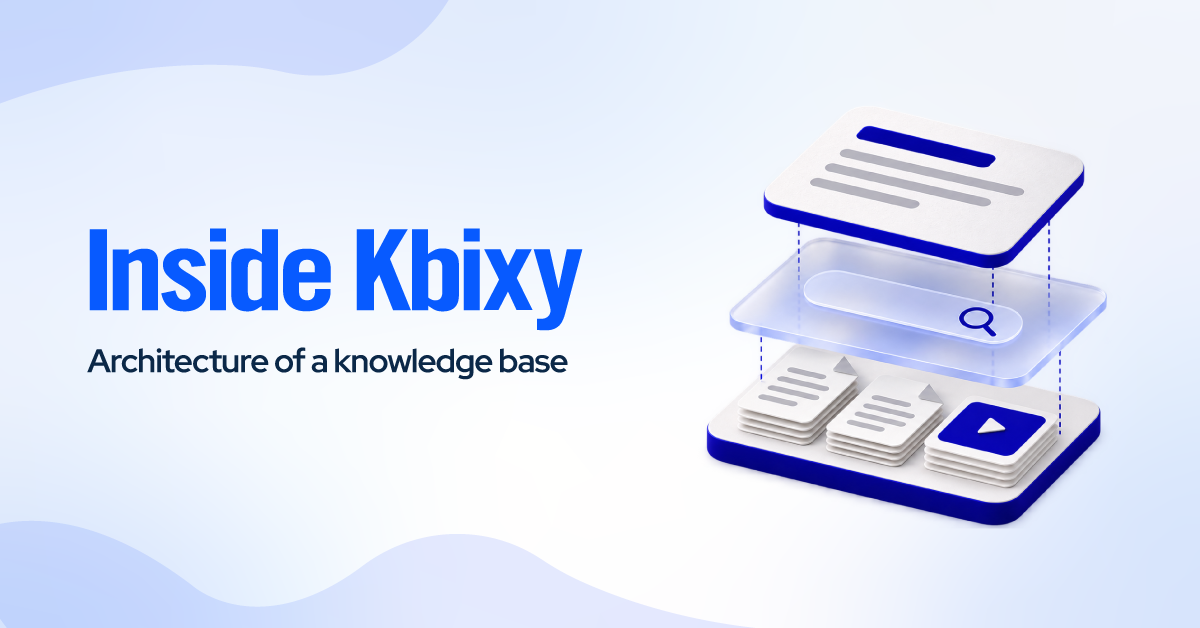
The components fit together in a straight line. The browser client talks to the Kbixy application. The application reads and writes articles, pushes media to Cloudflare R2, sends text to Claude for drafting and AI answers, embeds article and video details into the search index, and keeps it in sync. The MCP server sits beside the index and lets external AI assistants read, search, draft, edit, and publish articles.
Core Features That Define the Kbixy Platform
Three features carry most of the weight. Each one exists because of a specific failure we watched happen in client projects.
Distraction-Free Rich Text and Markdown Editor
The fastest way to kill a knowledge base is to make writing in it feel like work. The Kbixy editor is block-based and supports both rich text and Markdown, so technical and non-technical writers can work in the mode that suits them.
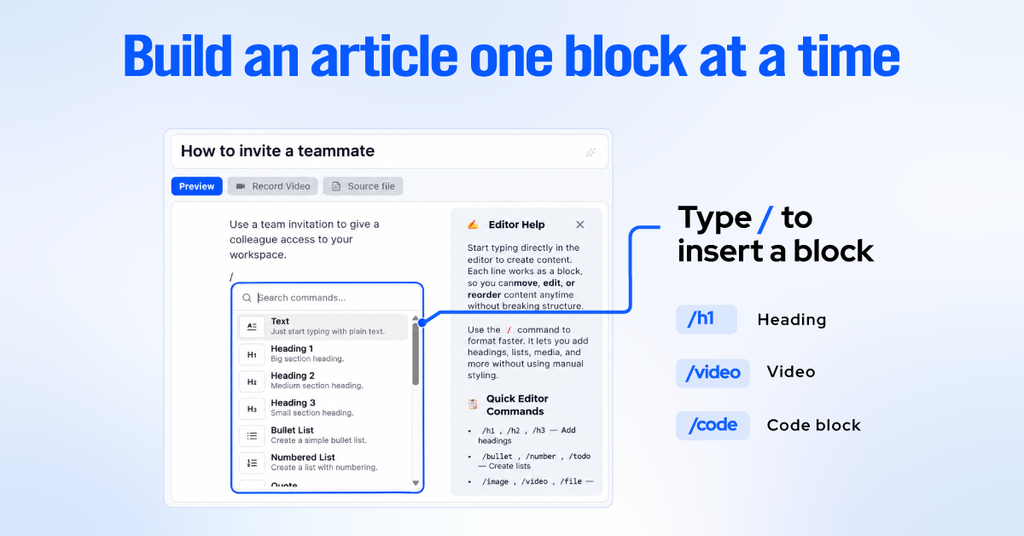
Slash commands handle formatting without breaking flow: type /h1, /video, or /code and keep writing. Code blocks, callouts, attachments, and embeds are native, and articles import and export as PDF or Markdown, so nobody is locked in or has to rebuild content by hand.
AI sits inside the editor rather than beside it. Kbixy can draft an article, summarize a long one, and suggest tags, with monthly usage scaled to the plan. The goal was never automated documentation. It was removing the blank page, which is where most internal documentation dies.
For knowledge that is faster to show than to write, a built-in recorder captures screen or camera, and Kbixy transcribes it so the content stays searchable alongside everything else.
Custom Branding and White-Label Domains
A help center that looks like someone else’s product undermines the product it supports. Every Kbixy workspace gets a branded space with its own logo, hero banner, and navigation.
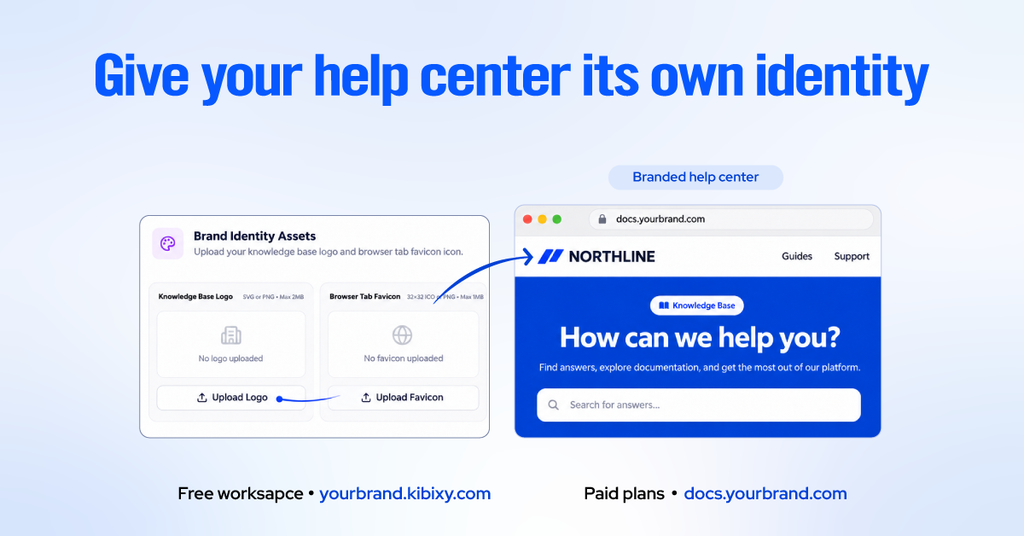
Free workspaces get a subdomain at yourbrand.kbixy.com. Paid plans add a custom domain such as docs.yourbrand.com plus white labeling, which removes Kbixy branding entirely so the help center reads as a native part of the customer’s site.
Search Analytics and Content Gap Insights
Most documentation tools report what people read. The more useful question is what they looked for and did not find.
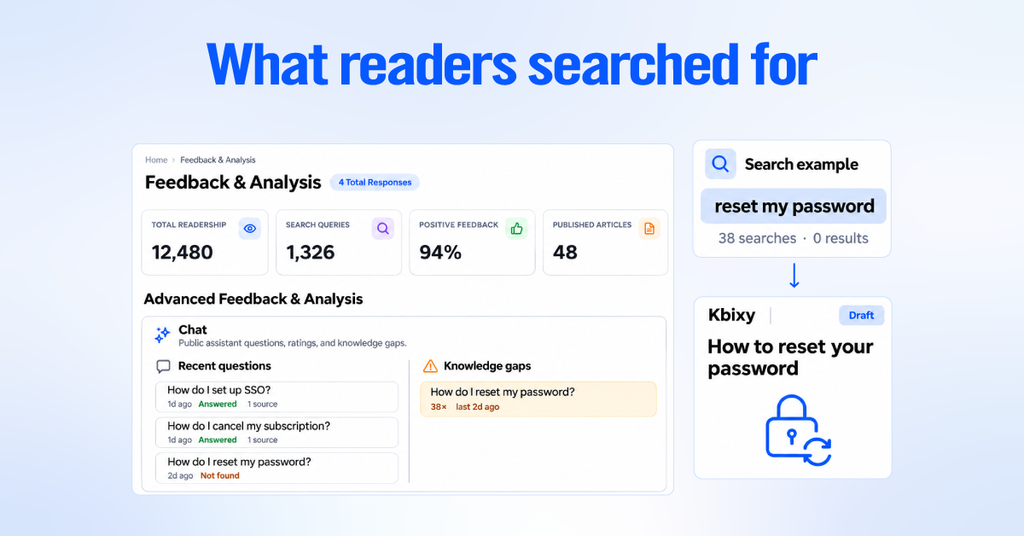
Kbixy tracks article views, searches, and helpfulness ratings, and lists the questions its AI assistant could not answer as knowledge gaps. A question that 38 people asked this month with no good answer is not a metric; It is a writing assignment. When the assistant comes up empty, you know exactly what to write next. That loop is the difference between a static archive and a knowledge base that improves on its own schedule.
Integrations keep the loop supplied. Google Drive import brings in existing Docs, Slides, Sheets, PDF, Word, Markdown, plain text, and CSV files, and Slack notifications announce new public articles in the channel of your choice.
From Agency MVP to SaaS Launch
Building the product was the straightforward part. Turning it into something people could find, trust, and pay for is where agency habits turned out to be an advantage.
Dogfooding Kbixy Inside Nexiby Workflows
Nexiby ran on Kbixy before anyone outside the company saw it. Client handoff guides, internal standard operating procedures, onboarding material, and recorded process walkthroughs all moved into the platform while it was still rough.
That is an uncomfortable way to test software and an efficient way to find what is missing. Features that looked essential on a roadmap turned out to be ignored. Gaps nobody had written down became obvious within a week, because the team hit them during real work rather than during a review meeting.
The Model Context Protocol work came out of exactly this. Our team was already asking ChatGPT, Claude, and Gemini questions all day, so grounding those assistants in our own documentation was the natural next step rather than a feature request. That setup has grown with the product, so today workspace owners approve every connection, connected assistants can retrieve, create, and update articles, and access can be reviewed and revoked at any time.
Combining Engineering with Marketing from Day One
Most SaaS products are built first and marketed later, which is why so many good products launch into silence. Nexiby does both, so kbixy.com was treated as part of the build rather than a task for afterward.
In practice, that meant positioning and messaging were argued out while features were still being scoped, the marketing site was built to the same performance standard as the product, and conversion rate optimization work started with the first visitors rather than after a traffic plateau.
It also meant search strategy shaped the product itself. Because customer help centers are public pages that need to rank, technical search engine optimization had to live inside the platform. Every customer who publishes an article is publishing on infrastructure that was designed by people who do this for a living.
5 Key Lessons for Building Your Own SaaS Product
If you are weighing up how to build a knowledge base platform, or any software product, these are the five lessons that cost us the most to learn.
- Solve a problem you experience firsthand before writing production code. We lived the documentation problem across client projects for years, which meant we could tell a real requirement from a nice idea without running a single survey.
- Treat speed as a core feature, not an optimization phase. For a search-driven tool, latency is the product. A knowledge base that takes three seconds to return an answer has already lost to the colleague sitting nearby.
- Build search engine optimization into the architecture. Customer-generated pages only drive organic growth if clean URLs, meta tags, sitemaps, and fast rendering are guaranteed by the platform rather than left to each customer.
- Keep the first version narrow and let real feedback open it up. Video recording, analytics, and external AI access were all deferred deliberately, and every one of them shipped better for having waited.
- Pair technical execution with a distribution plan from the start. A product with no audience is a hobby. Positioning, content, and conversion work should begin while the product is still being built.
Build Smarter Documentation with Kbixy
Every decision in this article points to the same outcome, which is a team that stops answering the same question twice.
If that is the problem you have, Kbixy is ready now. Start free at kbixy.com, with no credit card, a free forever plan, and a branded help center you can have live in an afternoon. Semantic search, AI-assisted writing, an AI assistant for your help center, searchable video, and MCP access for ChatGPT, Claude, and Gemini are all there when you need them.
If the problem you have is bigger than a help center, that is the other half of this story. Nexiby designs, builds, and markets web applications and SaaS products for founders and businesses, and Kbixy is what that work looks like when we are the client. If you have a product idea that needs architecture, engineering, and a distribution plan rather than just a developer, talk to the Nexiby team about scoping it.
Frequently Asked Questions
How long does it take to build a knowledge base platform?
A narrow first version with articles, categories, roles, and search is usually a few months of focused work. Semantic search, video transcription, multi-tenancy, and billing each add meaningful time. The honest answer depends entirely on how disciplined you are about what ships first.
What does it cost to build a SaaS product like this?
Cost is driven by scope rather than by feature count. Multi-tenancy, billing logic, security posture, AI usage, and a marketing site are the line items people forget when budgeting. A realistic figure only comes from a scoping session, so treat any quote given before that conversation with caution.
Should we build our own knowledge base or buy one?
Buy one unless the knowledge base is your product or a genuine competitive advantage. For most teams, the correct answer is a platform like Kbixy with a custom domain and your own branding. Build only when you need something the market genuinely does not sell.
What is MCP and why does a knowledge base need it?
The Model Context Protocol lets an AI assistant call tools on a server. Kbixy runs an MCP server, so ChatGPT, Claude, and Gemini can read, search, draft, edit, and publish articles in your knowledge base, allowing AI assistants to work directly with your documentation and provide answers grounded in your own knowledge base.
How do you keep company data private in an AI-powered product?
Through isolation and contract terms together. Each Kbixy workspace is separate, data is encrypted in the database and at rest on Cloudflare R2, and traffic runs over HTTPS. AI features use Anthropic’s Claude, whose commercial terms prohibit training on customer content, and Kbixy follows GDPR with export and deletion on request.